




Introduction
➤ Building Prefect Data Pipelines is a lot more than just scheduling Python scripts. workflows need to be reliable and easy to observe so that we can make business decisions. As the data grows, data pipelines have to be simple to operate.
➤ In this blog, we will share our experience of building real production data pipelines. We used Prefect to automate business reports and also integrated Zoho APIs. We will show you how we handled failures and improved the performance of the data pipelines. We followed practices for workflow orchestration with Prefect.
➤ We will additionally discuss the mistakes people make when building data pipelines with Prefect. We will give you solutions and tips that helped us design scalable data pipelines. These workflows run smoothly in production environments.
Why we chose Prefect for our data pipelines
➤ Our projects were getting really tough to manage, so we needed a way to handle our data pipelines. We were not just working with scripts and cron jobs anymore. We had to schedule reports and work with companies like Zoho through their APIs and deal with workflows that had tasks that depended on each other.
➤ Doing everything by hand or using cron jobs was not working out. It was hard to keep track of when things went wrong and to make sure everything was reliable, especially as we got pipelines.
Challenges we wanted to solve
➤ Before we started using Prefect, we had a lot of problems as follows:
-
-
Cron jobs were getting hard to manage as we added pipelines.
-
When jobs were not executed properly, we often did not notice until someone told us that data or reports were missing.
-
We did not have one place to check on all our pipeline runs.
-
Sometimes when things don’t work as expected and we don’t know where the error is, we have to run the entire flow again.
-
Our business needs pipeline are not fixed so that they run on a particular schedule; some need to execute daily, while others run weekly or monthly based on our needs.
-
Many data pipeline tasks are dependent on the previous task’s success, which makes it harder to deal with errors if the first one fails.
-
Why Prefect stood out
➤ Prefect makes it easy to challenges we faced for rely on cron jobs and scheduling, and we are already using Python in our project, so it was easy to pick up and get started.
➤ The dashboard that comes with Prefect is really useful because we can see how our workflows are doing, look at logs, and check the status of our deployments in one place, with detailed logging for each task in the workflow that helps us make our workflows more reliable.
➤ This lets us automate business processes without making things too complex. We like that Prefect is simple and easy to use.
Our data pipeline architecture
➤ Let’s talk about the data pipeline automation perfect flow we made for project reporting.
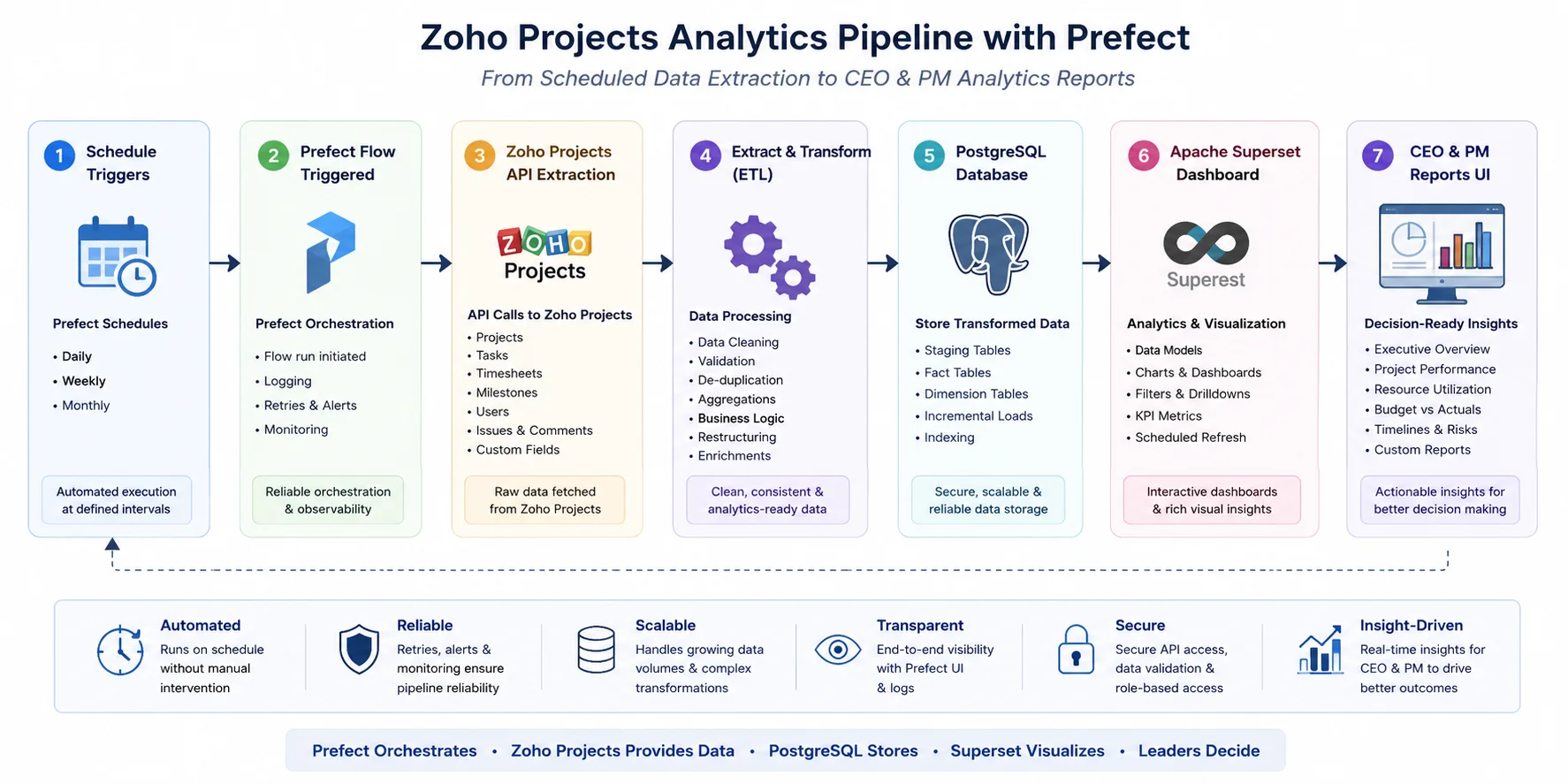
➤ Our organization uses India’s own Zoho Projects to keep track of team members’ work and project hours. The zoho built in report are limited for management needs, so we made a perfect workflow that automatically fetches the Zoho data through the API, stores it in the PostgreSQL database we want, and refreshes the Apache Superset dashboard.
➤ As our different clients need reports at different times, some need weekly, and some need monthly, so based on the needs, workflows are scheduled to run daily, weekly, and monthly. The project management team and CEOs can view the report, such as project-wise hours, associate utilization, without any manual work, and anytime they want.
Below is the Pipeline architecture
Sample perfect flow code snippets to get an idea
from prefect import flow, task

@task
def sync_zoho_data():
        #Fetch project and timesheet data from Zoho API
	pass
@task
def load_to_database():
        #Store transformed data in PostgreSQL
	pass

@flow
def zoho_analytics_pipeline():
	sync_zoho_data()
	load_to_database()

zoho_analytics_pipeline()
Technology stack used for this pipeline
➤ Python
➤ Prefect
➤ PostgresSQL
➤ Apache Superset
➤ By automating this workflow with Prefect, we eliminated manual report generation and saved hours for our project management team, ensuring superset dashboards always displayed the latest data, and created a smooth reporting system that supports business decisions with minimal operational effort.
Common challenges we faced
➤ Almost every project that goes to production first faces challenges, so we also face challenges when we first deploy data pipelines with Prefect to production, which are as follows :
- Handling task dependencies with each other requires proper flow design so that tasks execute correctly.
- Some long-running jobs sometimes occupy all available RAM on the server, so the tasks need to be optimised and break one big task into smaller tasks with retries.
- For hardcoded secret variables, we moved to securely stored API keys and credentials in environment variables.
- Different environments like development, staging, and production were hard to manage at first, but with separate deployment configurations with Prefect, it is easy.
- For failed workflow tasks, we relied only on terminal logs, but once we got to know about Prefect debugging logs, we started to use that it helps to improve performance and reduce failed workflows.
Lessons we learned building Prefect data pipelines
Building and deploying a production workflow taught that a successful data pipeline comes from following simple but effective practices:
- Always structure small and reusable flows instead of a single large workflow with retry logic for failed or delayed tasks from the beginning, and also implement detailed logging to help with debugging.
- Accept the failure and deal with it gracefully so that one task doesn’t stop the entire pipeline, and use environment variables instead of hardcoded values in code.
- Always maintaining task independence makes the data pipeline easier to test and manage.
- Always test the workflow before deploying to the production environment.
With the use of the above lessons and a perfect data pipeline, we created our SOP chatbot for internal use to avoid finding the SOP document manually.
Prefect best practices we recommend
➤ Following are the data pipeline best practices that help to build workflows that are reliable and easy to maintain :
- We suggest building projects as small tasks and reusable flows instead of a single large workflow.
- Use Prefect’s deployments feature to manage scheduling across environments such as development, staging, and production, keeping all flow code version-controlled.
- Configure email alerts and cliq / slack notifications to catch failures immediately and take action for smooth reporting, rather than relying only on automation.
- After running the flow smoothly, our work is not done; we need to monitor workflow performance on the Prefect dashboard, identify slow or failed tasks, and fix them to ensure proper results.
- Lastly, use proper and industry-standard naming conventions for flows, tasks, and deployments to improve readability, and if other team members need to check the flow, it is easy for them to debug and support collaboration as projects grow.
Performance optimizations that made a difference
➤ We reduced execution time by performing parallel independent tasks whenever possible instead of one large workflow.
➤ Data that was used a lot and did not change frequently was cached with Redis, so we didn’t make API calls and process it unnecessarily many times.
➤ We run every flow through scheduling, so workflows run only when needed, not continuously, which cuts resource usage on the server.
➤ Workflow scalability is improved by dividing large single workflows into smaller tasks, making failures easy to manage and debug.
➤ When we do this type of optimization, it reduces the infrastructure costs of the server, and we can utilize our server resources more effectively in the production workflow instead of increasing the server cost.
Mistakes we made
➤ We have learned some lessons from mistakes in our implementation that are as follows:
- Originally, we had hardcoded report names, so scheduling was difficult. We then moved to dynamic execution dates.
- One API failure would halt and fail the entire workflow until we added retry policies.
- We also missed monitoring of failed deployments from the starting which was solved by enabling notifications and alerts.
- We built a single large flow instead of smaller reusable sub-flows, which makes the workflow harder to maintain.
- Lastly, debugging was not easy at the start point as we did not enable it, so we implemented structured logging to maintain the workflow.
➤ Airflow or other tools like Dagster may be more adapted by organizations that have a large existing Airflow ecosystem running, but Prefect is a good choice for Python-based workflow automation.
Prefect vs other workflow orchestration tools
Below is the comparison table of features for Prefect with other workflow orchestration tools like Airflow and Dagster
| Feature | Prefect | Airflow | Dagster |
| Python-native | Yes | Partial | Yes |
| Easy setup | Yes | No | Moderate |
| Retry mechanism | Yes | Yes | Yes |
| UI | Excellent | Good | Excellent |
| Dynamic parameters | Excellent | Good | Excellent |
Production checklist
➤ Before deploying any data pipeline workflow, it is important to make sure the pipeline is secure and easy to maintain.
➤ Here’s a checklist we applied before deploying any workflow to avoid any errors after hitting production:
- Use the Prefect default deployment for every production workflow.
- Do not use hardcoded environment variables or blocks; always use environment variables.
- Configure retry policies for the database and API in case of failure; it helps.
- Enable Prefect logging to monitor and debug every pipeline.
- For delayed and failed workflows, set alert notifications and emails.
- Test the complete workflow before pushing it to the production workflow.
- Once deployed, monitor the workflow to optimize and identify slow-running tasks.
- Maintain versions to track changes in flows and deployments.
- Maintain documentation for every workflow so that, in your absence, other team members can also understand and update the pipeline if needed without confusion.
➤ The above checklist helps to build scalable and maintainable production data pipelines that can help production workloads with confidence.
Most frequently asked question in FAQ
Prefect is used to automate, schedule, and monitor data pipelines through flows. It makes workflows more reliable with features like retries and logging in custom runs if an error occurs.
Use modular flows, secure secret management, retry policies, monitoring, version control, and extensive testing before deployment.
Common problems faced when using Prefect are managing interactions between tasks, processing long-running jobs, as it has lots of logs, and managing workflows in different environments.
Build reusable flows, prevent hardcoded configurations in flows, enable logging and retries, use deployments, and constantly monitor the pipeline performance.
Prefect provides a dashboard with a user-friendly UI to track the flow runs, view logs and errors, monitor task status, and configure alerts and email notifications for failures or delayed executions.
Conclusion
➤ Creating Prefect Data Pipelines helped us to automate critical business workflows, reduce manual effort, and build strong reporting systems for production environments.
➤ In today’s changing world with AI, it is important that we automate things we have done manually for years, so we need to build solutions that are scalable and automatic.
➤ This culture at August Infotech helps to deliver efficient data pipeline automation for our clients using modern technologies like Prefect, PostgreSQL, and Apache Superset.
➤ We hope the challenges, mistakes, best practices, and optimization techniques shared in this blog help you build more reliable, maintainable, and production-ready data pipelines for your own projects.