





Introduction
If you run Drupal with Redis in production, this problem shows up sooner or later. You clear Drupal caches. Pages rebuild. Performance looks normal. But when you check Redis, memory usage barely changes. Sometimes, it keeps growing for days.
That disconnect is confusing the first time you see it. Clearing Drupal cache feels like it should clean Redis too. In reality, it often doesn’t. This is the core Drupal cache clear not releasing Redis memory issue developers face when using Drupal with Redis as a cache backend.
I ran into this on a real project with frequent deployments and a busy Redis instance. Over time, Redis memory kept climbing even though cache clears were happening regularly. That experience pushed me to dig deeper and build a practical, safe way to clean Redis without flushing everything.
Quick summary
- Clearing the Drupal cache does not guarantee that Redis memory is freed
- Redis keeps keys unless they are explicitly deleted
- Full Redis flush is risky in production
- Prefix-based cleanup using SCAN is the safest approach
- Automation helps prevent long-term Redis cache clearing problems
Why clearing Drupal Cache doesn’t free Redis memory
Cause: Drupal invalidates cache entries instead of deleting them.
Explanation:
When you clear caches in Drupal, the system focuses on cache tags and metadata. Items are marked as invalid, so they won’t be reused. From Drupal’s point of view, the cache is gone.
Redis doesn’t work that way. Redis stores keys and values. Unless those keys are deleted or expired, Redis keeps the memory allocated. Drupal has no built-in process
that aggressively removes old Redis keys after invalidation.
What this really means is simple: Drupal forgets about the cache, but Redis does not. That’s why Redis memory not freed after cache clear is such a common Drupal Redis cache issue.
How Drupal uses Redis for caching
Drupal uses Redis as a backend for cache bins to improve performance. Each cache item becomes a Redis key, usually with a prefix to avoid conflicts between sites or environments.
Key things to understand:
- Drupal writes cache data to Redis.
- Redis stores keys independently of Drupal logic.
- Clearing Drupal cache Redis-side does not always remove keys.
- Redis memory is released only when keys are deleted.
This separation is powerful, but it also explains why Drupal cache clear is not releasing Redis memory management in Drupal and why its requires extra care. Drupal controls when data is stale. Redis controls how long memory stays allocated.
Common reasons Redis memory stays high
Redis memory staying high is rarely caused by a single issue. It’s usually a combination of factors:
- Old cache keys that were invalidated but never deleted.
- Memory fragmentation inside Redis.
- Cache prefixes changing after deployments or configuration changes.
- Eviction policies that don’t aggressively reclaim memory.
- Keys without proper expiration times
Over time, these add and turn into a Redis cache clearing problem that quietly affects stability and performance.
How to fix Redis memory issues in Drupal
When Redis memory keeps growing even after clearing caches, the long-term fix isn’t a full flush. That’s heavy, risky in production, and blows away everything Redis holds. Instead, you want controlled cleanup of only the Redis keys your Drupal site owns. The Redis Cache Clear module available on Drupal.org makes that easy and safe.
1. Use our custom module for manual cleanup
Our module gives you a simple admin route where you can trigger a Redis cleanup on demand. This is especially useful after big deployments or when you notice memory spikes.
Behind the scenes, it connects to Redis using the standard Drupal Redis client, looks for keys that match your site’s prefix, and deletes them incrementally using SCAN (not KEYS). That keeps Redis responsive and avoids blocking. The core logic looks like this:
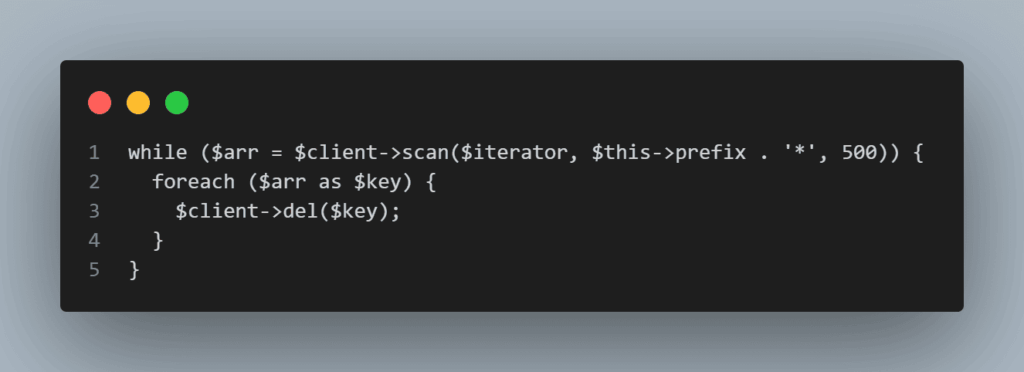
This pattern ensures only keys relevant to your Drupal cache are removed.
2. Delete Redis keys by prefix
The safest fix is to delete only the Redis keys that belong to your Drupal site.Instead of wiping Redis completely, you target keys by prefix, for example:
drupal.redis.11.1.5*
The critical detail is how you scan those keys.
Using KEYS may look simple, but it blocks Redis and can harm production traffic. SCAN iterates gradually and keeps Redis responsive while cleanup is running.
3. Manual cleanup through admin UI
Sometimes you need control. A deployment introduces unexpected cache growth.
Memory usage spikes. You want a safe way to clean Redis immediately.
A simple admin action that clears Redis keys by prefix allows controlled cleanup without touching unrelated data. This is especially useful when investigating Redis memory management issues in Drupal environments.
4. Automated cleanup with cron
Manual cleanup alone is not enough. Redis memory problems grow slowly and predictably. Automated cleanup via cron:
- Runs at a configurable interval
- Prevents repeated or accidental execution
- Cleans Redis only when needed
- Logs how many keys were removed
This approach keeps Redis memory stable over time and supports Drupal Redis performance optimization.
5. Respect Redis prefix configuration
Prefix handling matters, especially on shared Redis instances. If a custom prefix is configured, it should be used. Otherwise, falling back to the Redis client’s default prefix avoids accidental deletion of unrelated keys.
Best practices to prevent Redis memory problems
Once Redis is under control, keeping it healthy is much easier than fixing it later.
- Use consistent Redis prefixes per environment.
- Avoid changing prefixes unless necessary.
- Prefer SCAN over KEYS in all production scripts
Schedule controlled Redis cleanup. - Monitor Redis memory usage regularly.
These practices reduce long-term risk and improve overall Drupal Redis performance optimization.
Most frequently asked question in FAQ
Conclusion
The reason Redis memory stays high after clearing Drupal cache is a mismatch in responsibility. Drupal manages cache validity. Redis manages memory.
Once that distinction is clear, the fix is straightforward. Clean Redis deliberately, avoid full flushes, and automate cleanup where possible. This keeps Redis stable, predictable, and boring — which is exactly what you want from cache infrastructure.